Blog
How Does Time Get Into My Watch?
I take a closer look at how radio-controlled clocks synchronize with the DCF77 time signal in Europe.
Contents
A New Watch
I recently bought a new watch. Specifically, a Casio G-Shock GW-M5610U-1ER . Mainly because I was getting very distracted by my smartwatch throughout the day. You can see a pattern if you read my previous Bullet Journal blogpost . So I decided to buy a regular watch that would still be practical for me. And the Casio offered all the features I needed. Most importantly, it’s solar-powered. As someone who frequently walked around with a dead smartwatch on my wrist because I had forgotten to charge it the night before, that’s incredibly helpful. On top of that, I love the 90s retro aesthetic of Casio watches.
After the purchase, one feature of this new watch caught my attention. It was heavily advertised as Multi Band 6. That meant nothing to me at the time. So I looked it up and discovered that Casio uses this term for the radio reception capability of their watches. Six major radio transmitters worldwide are supported, including ones in North America, Japan, China, and also here in the EU. In fact, Europe has two: one station in Anthorn in the United Kingdom and one station in Mainflingen, Germany (near Frankfurt). This radio time transmitter is also known as DCF77. In the following, I’d like to take a closer look at how time gets from the radio transmitter into my watch.
The DCF77
The DCF77 is a transmitter operated by the Physikalisch-Technische Bundesanstalt (PTB) , and it has been used for transmitting time information since 1973. The name DCF77 is derived from D for Deutschland (Germany), C for the designation of a longwave transmitter, and F for its proximity to Frankfurt. The 77 comes from the fact that the transmitter broadcasts its information on a frequency of 77.5 kHz.
The Time Signal
The transmitted time signal is sent in binary. To achieve this, the signal strength is briefly reduced to about 15% once per second. The crucial factor is the duration of the reduction. For a binary 0, the signal is reduced for approximately 100ms; for a binary 1, it’s 200ms. This results in 59 bits of information per minute. Why not 60? Because during the last second of each minute, no signal reduction occurs. This makes it possible to clearly identify when a new minute begins and when the binary data stream for the next minute starts.
The Time Code
Within the 59 bits, the time information is always encoded according to a specific scheme. On the PTB’s website, you can find the following visual representation of the Time Code.
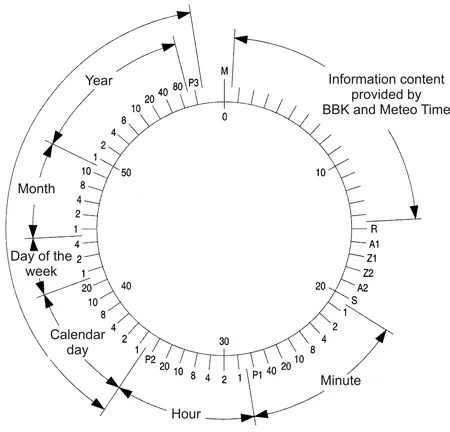
The Time Code always begins with the following meta information:
- Bit 0 is always 0. It marks the start of a new minute
- Bits 1-14 are not part of the time information. They are used by the company Meteotime to send encrypted weather information
- Bit 15 is the so-called “call bit” and serves as an alert for PTB staff in case of operational problems
- Bit 16 announces a switch from winter to summer time or vice versa. This bit is transmitted every minute for one hour before the changeover.
- Bits 17-18 encode the current time zone. 01 for winter time (CET) and 10 for summer time (CEST).
- Bit 19 announces a leap second. Just like the bit for the time change, this is transmitted every minute for one hour before the adjustment.
- Bit 20 is always 1 and marks the start of the following time information
The time information is sent as so-called Binary-Coded Decimals (BCD) . This means that each decimal digit is represented individually using bits. For the numbers 0-9, a total of 4 bits are needed, representing 1 2 4 8. Theoretically, the numbers 0-15 are possible within these bits, but not all are used.
The BCD system is actually somewhat outdated, mainly because it is quite wasteful. As with everything, however, there are still use cases for the BCD system today. Among others, in the financial industry, because it is not susceptible to rounding errors. Another — albeit marginal — advantage is that it can be easily read in the hexadecimal system. In the table below, you can see all decimal numbers from 0-9 and their representation in the BCD and hex systems.
| Bits | Number | Hex |
|---|---|---|
| 0000 | 0 | 0 |
| 0001 | 1 | 1 |
| 0010 | 2 | 2 |
| 0011 | 3 | 3 |
| 0100 | 4 | 4 |
| 0101 | 5 | 5 |
| 0110 | 6 | 6 |
| 0111 | 7 | 7 |
| 1000 | 8 | 8 |
| 1001 | 9 | 9 |
An interesting fact in the DCF77 Time Code is that not all 4 BCD bits are always used. For example: when representing the minutes, only 3 bits are used for the tens digit, since the maximum value is 60. The exact time information is encoded as follows:
| Bits | Assignment | Meaning |
|---|---|---|
| 21-24 | 1 2 4 8 | Minute (ones) |
| 25-27 | 10 20 40 | Minute (tens) |
| 28 | Parity bit minute | |
| 29-32 | 1 2 4 8 | Hour (ones) |
| 33-34 | 10 20 | Hour (tens) |
| 35 | Parity bit hour | |
| 36-39 | 1 2 4 8 | Day of month (ones) |
| 40-41 | 10 20 | Day of month (tens) |
| 42-44 | 1 2 4 | Day of week |
| 45-48 | 1 2 4 8 | Month (ones) |
| 49 | 1 | Month (tens) |
| 50-53 | 1 2 4 8 | Year (ones) |
| 54-57 | 10 20 40 80 | Year (tens) |
| 58 | Parity bit date |
The Parity Bit
To verify the integrity of the data, a total of three parity bits are included in the signal. These are located at positions 35, 49, and 58, and each refers to the preceding groups. Even parity is used for the parity bits. This means that first the sum of all 1-bits in a group is calculated. If this sum is odd, the parity bit is set to 1. If the sum is even, the parity bit is 0. So if the total of all 1-bits in a group including the parity bit results in an even number, the data can be assumed to have been received correctly.
If that is not the case, the data is corrupt. There is no solution for this — you simply have to wait for the next minute cycle of the Time Code. That’s why receiving the time sometimes takes a bit longer in bad conditions.
Receiving the Signal
To receive the time signal, you first need an antenna. There is a wide selection available from well-known shops like ELV, Pollin, Reichelt, etc. Since I’m not very hardware-savvy myself, I instead turned to the great radio community. On Receiverbook there are numerous receivers that offer a visual view of radio signals through various open-source web interfaces. In my case, it’s an instance running KiwiSDR .
When you tune the receiver to the frequency 77.5 kHz, you should be able to see the DCF77 signal: 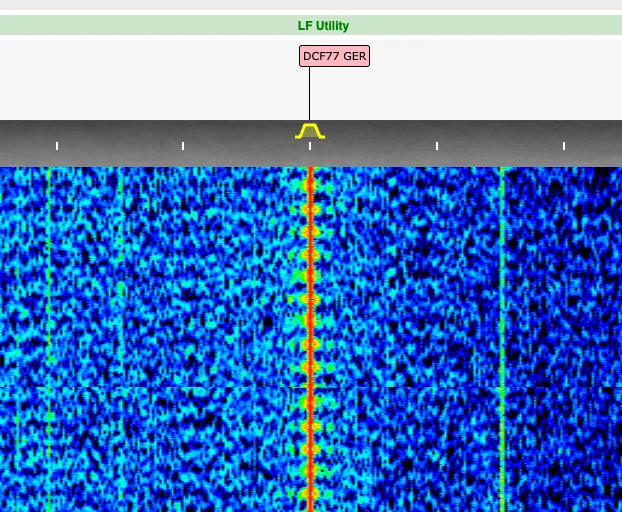
In the image, you can see how a continuous signal is being transmitted on the frequency, which briefly weakens at regular intervals.
Reading the Data
Fortunately, to extract the time information from the signal shown, there is a plugin for KiwiSDR called timecode. It handles the translation of the transmitted signal into the bits of the Time Code for us. In my test, I received the following bit sequence:
0 10100110011111 00010 1 0110010 1 001010 0 100011 101 10000 10100100 1 1Conveniently, the data is already separated by their groups in the Time Code. So we can ignore the first bit and the following large block of weather information for the purpose of reading the time information.
We will now go through the received bit sequence step by step, read the contained data, and piece together the time information.
Meta Information
We received the following bits for the meta information.
00010These mean the following:
| Bit | Meaning |
|---|---|
| 0 | Call bit. No irregularities |
| 0 | No announced switch from summer to winter time or vice versa |
| 01 | It is currently winter time |
| 0 | No leap second is being inserted |
Minutes
Bits:
0110010Translated to the BCD system, this means:
Bit 0 1 1 0 0 1 0BCD 1 2 4 8 10 20 40The sum of the BCD values gives 2 + 4 + 20 = 26. This means: 26 minutes.
The parity bit transmitted for this group was 1. We received 3 one-bits in this group, so the data is correct.
Hours
Bits:
001010BCD:
Bit 0 0 1 0 1 0BCD 1 2 4 8 10 20Result: 4 + 10 = 14. This means: 14 hours.
The parity bit transmitted for this group was 0. We received 2 one-bits in this group, so the data is correct.
Day of Month
Bits:
100011BCD:
Bit 1 0 0 0 1 1BCD 1 2 4 8 10 20Result: 1 + 10 + 20 = 31. This means: 31st day of the month.
Day of Week
Bits:
101BCD:
Bit 1 0 1BCD 1 2 4Result: 1 + 4 = 5. This means: Friday.
Month
Bits:
10000BCD:
Bit 1 0 0 0 0BCD 1 2 4 8 10Result: 1. This means: January.
Year
Bits:
10100100BCD:
Bit 1 0 1 0 0 1 0 0BCD 1 2 4 8 10 20 40 80Result: 1 + 4 + 20 = 25. This means: 2025.
The year is always specified only for the current century. So only the last two digits from 00 - 99 are provided.
The parity bit applies to all preceding date groups. In total, we received 9 one-bits. The parity bit we received is 1, so these data are correct as well.
Final Result
The result of this lengthy calculation gives us the following date and time:
Friday 31.01.2025 14:26 Winter TimeRoom for Optimization
After reading the Time Code specification, I was quite surprised by the choice of the BCD system. Especially because there is room for optimization.
If instead of BCD, the “normal” binary system were used — that is, 1 2 4 8 16 32 64 ... instead of 1 2 4 8 10 20 40 80 ... — a total of 4 bits could be saved across the minutes, hours, month, and year fields.
However, considering that the signal has been transmitted unchanged for over 50 years, I can understand why such adjustments are neither desired nor necessary. On the contrary, I find it fascinating that it has stood the test of time for so long and remains relevant to this day.
My Thoughts
It’s astonishing that DCF77 has been broadcast in an unchanged format for such a long time. The longevity of the radio signal also means that I could buy a radio-controlled clock from the 1970s today and it would still — and will continue to — display the correct time.
As someone who has developed a lot of software myself, I can’t even imagine that code I’ve written will still be actively used in 50 years. A truly outstanding achievement by the brilliant minds behind the development of the Time Code.